


Players of Dungeons & Dragons, Daggerheart, and pretty much every tabletop RPG are going to surprise you. That’s just part of being a Game Master. Thankfully, in the digital age, there are plenty of tools to help make game prep easier. One such tool is Dungeon Scrawl’s new Random Dungeon Generator.
With a simple click (and quick settings adjustments if you want), a dungeon map appears on your screen. It’s not AI-generated. It isn’t taken from other maps that are already posted online by skilled artists. Dungeon Scrawl’s tool uses a math-based algorithm to put together a set of interconnected shapes that form a bird’s eye map view. You can even edit the result to add colors, props, or entire rooms to your instant dungeon.
Dungeon Scrawl can be linked to Roll20, allowing you to easily import your creations. This is great for when your players decide to go on a side quest you haven’t prepared for. Here are some tips for making a dungeon, quickly customizing it, and having it ready for play today.
Instantly Creating A Dungeon For VTT
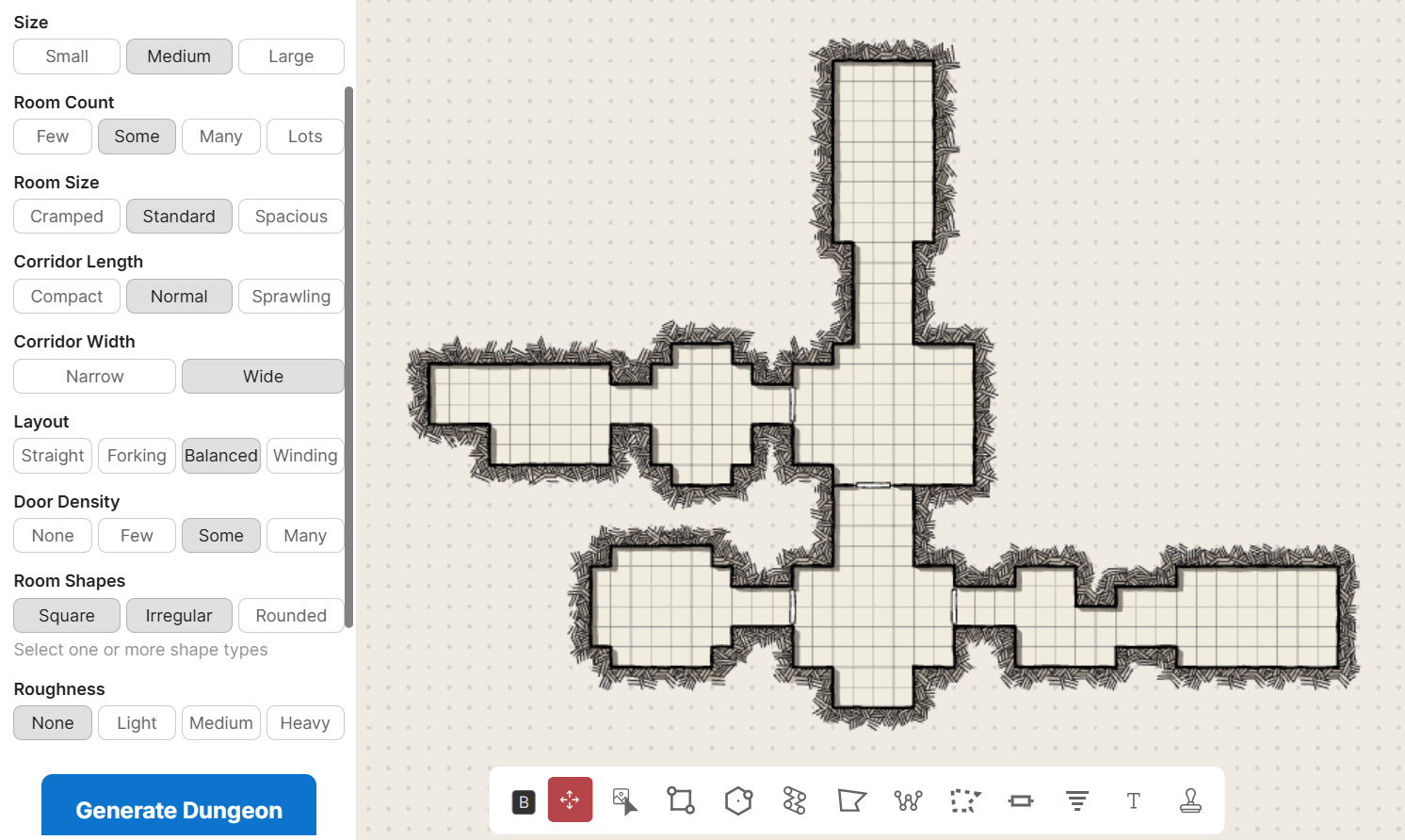
This is the easiest part: go to Dungeon Scrawl, find the little ? dice icon on the left, and hit the big blue “Generate Dungeon” button. Boom, you have yourself a dungeon. It will be rendered in classic pen-and-paper style with a grid, thick lines, and a tan background.
You can toggle certain properties before creation such as size, room count, room shapes, and corridor width. These toggles are right above the “Generate Dungeon” button and are organized into clear categories. You can even choose two different shape types to make a dungeon that has both perfect rectangle rooms and rounded chambers.
Your generated dungeon can immediately be downloaded as an image file to upload your VTT of choice, or be linked straight to Roll20.
Editing An Instantly Generated Dungeon
The toggles help you manipulate the overall shape of your dungeon. This is great if you need on-the-fly because your players made a sudden unexpected excursion. But if you have a little time to tinker, you can edit randomly generated dungeons to add immersive features.
First, you can draw on a randomly generated dungeon using Dungeon Scrawl’s tools. It’s as easy as clicking and dragging on your map. You can connect rooms to make hallways or use things like the rectangle tool to quickly create a new chamber. For those who are more visual learners, Bob World Builder has a video on quick Dungeon Scrawl drawing tips.
The toolbar at the bottom gives you easy ways to add small traversal features. There’s doors for your rogues to lockpick, stairs to add a bit of dimension so it doesn’t feel like a series of samey flat rooms, and text should you want to label things if your party got a map ahead of time. The greatest free tool Dungeon Scrawl gives you, however, is the sticker library.
Dungeon Scrawl comes with a sizable free selection of images that you can plop onto your maps. Courtesy of Tom Cartos, these include common features such as trees, pools, bandit camps, and boats. Stickers give you a fast, simple way to communicate the vibe of your dungeon to players. You can show that there’s an enemy presence, that the ruins are in the process of being reclaimed by nature, or that boats of previous explorers met a terrible fate.
Make It Look Professional
You can play with things like layers and shading to give your dungeon a more focused aesthetic. Little details such as matching color palettes and the presence of shadows can really immerse your players in the setting. This does start to move out of the “quick and easy” advice we’re focusing on here, but it’s worth it if you have the time/know how. Even small changes like turning a lava pool green can change your dungeon from a volcano to an acid-spewing dragon’s lair.
Dungeon Scrawler Pro comes with Roll20 Elite. A Pro account affords you more options for tailoring your dungeon’s vibe. Pre-set worldbuilding templates instantly render your dungeon as foliage-heavy, volcanic, dirt road, or waterlogged. Pro tools also allow you to change the floor texture and add lighting elements.
Finally, you can upload your own images into Dungeon Scrawl. This is handy if you need very campaign-specific props.
Insta-Dungeons In A Nutshell
There’s a wide world of Dungeon Scrawl advice videos on YouTube if you want to delve into how to make fantastic creations. But if you need something for a session that starts in 10 minutes, stick to the basics:
- Use Random Dungeon Generator to make something small/medium sized with a moderate room count.
- Add a handful of locked doors or passageways blocked by boulders/debris.
- Use stickers to represent enemy camps, fallen ruins, or nature reclaiming the area. These cluttered areas are great for tactical combat encounters.
- If you have the time and skill, you can create immersion with lighting elements. But don’t get too carried away if you’re short on time. Many players just want to explore a cool place, fight monsters, and get loot. As long as your dungeon gives every player a chance to use their abilities, they’ll have a great time.
Sergio Solórzano is the best Dungeon Master in the USA (according to an official D&D competition, anyway). He loves minis and terrain but also goes all-in on improv!


